Are they slim yet, round 2
/ 5 min read
Table of Contents
A year later let’s see how Firefox fares on Windows, Linux, and OSX with multiple content processes enabled.
Results
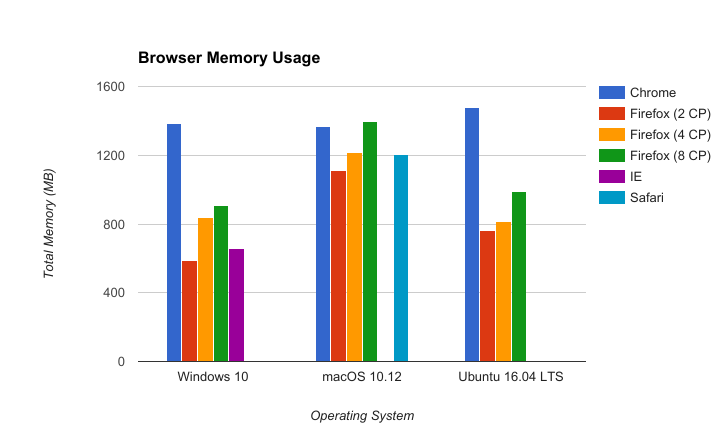
We can see that Firefox with four content processes fares better than Chrome on all platforms which is reassuring; Chrome is still about 2X worse on Windows and Linux. Our current plan is to only move up to four content processes, so this is great news.
Two content processes is still better than IE, with four we’re a bit worse. This is pretty impressive given last year we were in the same position with one content process.
Surprisingly on Mac Firefox is better than Safari with two content processes, compared with last year where we used 2X the memory with just one process, now we’re on par with four content processes.
I included Firefox with eight content processes to keep us honest. As you can see we actually do pretty well, but I don’t think it’s realistic to ship with that many nor do we currently plan to. We already have or are adding additional processes such as the plugin process for Flash and the GPU process. These need to be taken into consideration when choosing how many content processes to enable and pushing to eight doesn’t give us much breathing room. Making sure we have measurements now is important; it’s good to know where we can improve.
Overall I feel solid about these numbers, especially considering where we were just a year ago. This bodes well for the e10s-multi project.
Test setup
This is the same setup as last year. I load the first 30 pages of the tp5 page set (a snapshot of Alexa top 100 websites from a few years ago), each in its own tab, with 10 seconds in between loads and 60 seconds of settle time at the end.
Note: There was a minor change to the setup to give each page a unique domain. At least Safari and Chrome are roughly doing process per domain, so just using different ports on localhost was not enough. A simple solution was to modify my /etc/hosts file to add localhost-<1-30> aliases.
Methodology
Measuring multiprocess browser memory usage is tricky. I’ve settled with a somewhat simple formula of:
total_memory = sum_uss(content processes) + sum_rss(parent processes);Where a parent process is defined as anything that is not a content process (I’ll explain in a moment). Historically there was just one parent process that manages all other processes, this is still somewhat the case but each browser still has other executables they may run in addition to content processes. A content process has a slightly different definition per browser, but is generally “where the pages are loaded” – this is an oversimplification, but it’s good enough for now.
My definitions:
Browser Content Definition Example “parent”
Firefox
firefox processes launched with the -contentproc command line.
firefox without the -contentproc command line, plugin-process which is used for Flash, etc.
Chrome
chrome processes launched with the --type command line.
chrome without out the --type command line, nacl_helper, etc.
Safari
WebContent processes.
Safari, SafariServices, SafariHistory, Webkit.Networking, etc.
IE
iexplore.exe process launched with the /prefetch command line.
iexplore without the /prefetch command line.
Edge
MicrosoftEdgeCP.exe processes.
MicrosoftEdge.exe, etc.
For Firefox this is a reasonable and fair measurement, for other browsers we might be under counting memory by a bit. For example Edge has a parent executable, MicrosoftEdge.exe, and a different content executable, MicrosoftEdgeCP.exe, arguably we should measure the RSS of one the MicrosoftEdgeCP.exe processes, and USS for the rest, so we’re probably under counting. On the other hand we might end up over counting if the parent and content processes are sharing dynamic libraries. In future measurements I may tweak how we sum the memory, but for now I’d rather possibly under count rather then worry about being unfair to other browsers.
Raw numbers
OS Browser Total Memory
Ubuntu 16.04 LTS Chrome 54 (see note) 1,478 MB
Ubuntu 16.04 LTS Firefox 55 - 2 CP 765 MB
Ubuntu 16.04 LTS Firefox 55 - 4 CP 817 MB
Ubuntu 16.04 LTS Firefox 55 - 8 CP 990 MB
macOS 10.12.3 Chrome 59 1,365 MB
macOS 10.12.3 Firefox 55 - 2 CP 1,113 MB
macOS 10.12.3 Firefox 55 - 4 CP 1,215 MB
macOS 10.12.3 Firefox 55 - 8 CP 1,399 MB
macOS 10.12.3 Safari 10.2 (see note) 1,203 MB
Windows 10 Chrome 59 1,382 MB
Windows 10 Edge (see note) N/A
Windows 10 Firefox 55 - 2 CP 587 MB
Windows 10 Firefox 55 - 4 CP 839 MB
Windows 10 Firefox 55 - 8 CP 905 MB
Windows 10 IE 11 660 MB
Browser Version Notes
-
Chrome 54 – aka chrome-unstable – was used on Ubuntu 16.04 LTS as that’s the latest branded version available (rather than Chromium)
-
Firefox Nightly 55 - 2 CP is Firefox with 2 content processes and one parent process, the default configuration for Nightly.
-
Firefox Nightly 55 - 4 CP is Firefox with 4 content processes and one parent process, this is a longer term goal.
-
Firefox Nightly 55 - 8 CP is Firefox with 8 content processes and one parent process, this is aspirational, a good sanity check.
-
Safari Technology Preview 10.2 release 25 was used on macOS as that’s the latest branded version available (rather than Webkit nightly)
-
Edge was disqualified because it seemed to bypass the hosts file and wouldn’t load pages from unique domains. I can do measurements so I might revisit this, but it wouldn’t have been a fair comparison as-is.